
How hardware wallets for crypto work and compare to software wallets

What hardware wallets for crypto actually do
A crypto wallet doesn't actually store your coins. The blockchain does that. What the wallet stores are the cryptographic keys that let you move those coins around. A public key acts like an account number you can share with anyone. A private key acts like the password and signature that lets you authorize a spend. Lose access to those keys, and your assets sit frozen on the blockchain, visible to everyone but impossible for you to touch.
"Contrary to popular belief, a wallet does not store your coins. As a crypto owner, you don't store crypto on your hardware wallet - you use it to store your private keys."
This is why a crypto hardware wallet matters. It's a physical device that generates and holds your private keys in an isolated environment, cut off from your internet-connected phone or computer. When you want to send funds, the device signs the transaction internally and never lets the private key touch your connected device. That isolation is the whole point.

Hot, cold, and warm wallets
Hot wallets keep keys exposed through an internet-connected environment. Think browser extensions, mobile apps, desktop programs, or web-based accounts. MetaMask, Rainbow, and Rabby are common examples. They're convenient for daily use - quick access, easy swaps, smooth DeFi interaction. But that always-online connection also means more attack surfaces: the wallet app itself, the browser, the operating system, the device, the extensions, the remote service behind it all.
Cold wallets keep private keys offline. This is where hardware wallets live, alongside paper wallets and metal backup plates. The tradeoff is real: you need a connected device to build and broadcast transactions, but the signing happens on the isolated hardware. That split is the entire security model.
Warm wallets sit in the middle. Keys stay online but need human approval before each transaction goes through. They're faster than cold storage for regular activity, but they still expose keys to online threats in a way that a true hardware wallet doesn't. The security boundary is softer.
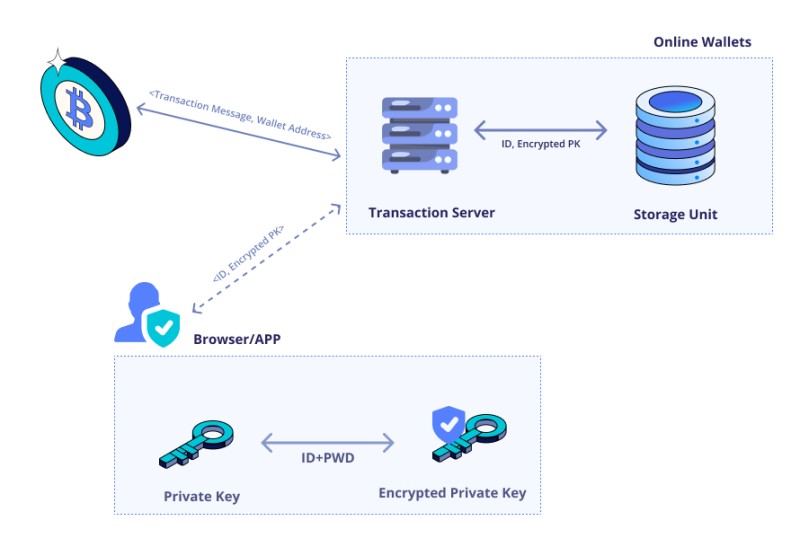
Hot wallets
Hot wallets are the easiest to use. Install them, set a password, and you're ready to go. For daily trading, token swaps, or messing with decentralized apps, they're hard to beat on convenience. But every path to your keys is also a vulnerability. Encryption helps, but it doesn't patch software bugs, malware, phishing, or a compromised supply chain. A guide once noted that desktop wallets offer decent protection compared to other hot wallet types, but warned that an infected computer can still expose your keys regardless.
Types of hot wallets
- Online wallets controlled by third parties that may hold your keys
- Smartphone apps for portable access on the go
- Desktop applications installed on a personal computer
- Browser extensions connected to online services
Cold wallets
Cold wallets keep private keys offline to dodge internet-based threats. Beyond hardware devices, this category includes paper wallets and metal seed backups. The catch is that spending usually requires moving the key into an online environment, which can expose it to whatever malware is on that computer.
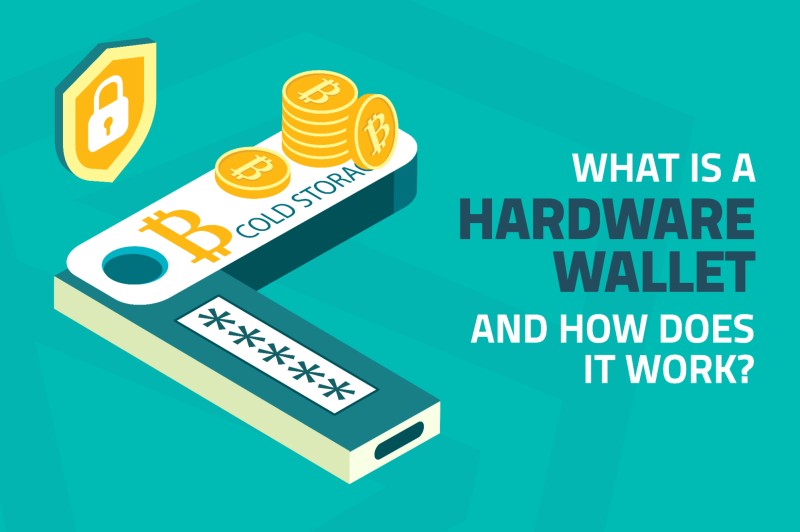
A cold storage cryptocurrency device is built to sign transactions without releasing the private key to your connected device. Some guides draw a strict line between cold storage and connected activity - once a device talks to a blockchain app, it's no longer "cold" in a narrow sense. But the practical distinction holds: the key stays isolated even when the companion interface is online. The difference isn't whether any device connects to the internet; it's where the key exists and where signing happens.
The anatomy of a hardware wallet
A dedicated crypto currency hardware wallet is a small computer built for one job: generate, store, and use private keys while staying cut off from your phone or computer's internet connection. Inside, you'll find a chip or microcontroller, specialized firmware, and a screen with buttons for confirming transactions.
Core components of a hardware wallet
- A chip or microcontroller for key generation and cryptographic operations
- Specialized firmware designed to handle keys and signing
- A display and physical buttons for transaction verification
A USB crypto wallet connects to your computer via a cable, which is the most common interface. Some devices also offer Bluetooth or QR-code options. Most of these devices plug into your phone or computer through USB, Bluetooth, or QR code. The external app you use handles picking the asset, recipient, amount, network, and fees. The hardware device does the final key operation and, when designed properly, independently verifies what you're seeing on screen. That separation matters.
How transactions get signed on a hardware device
When you want to move funds, here's what happens. You connect your device to your phone or computer. The companion software builds an unsigned transaction and sends it to the hardware wallet. The device displays the transaction details on its own screen - recipient, amount, asset, network, fees. You review it and confirm on the device itself by pressing a button or entering your PIN. The private key inside signs the transaction without ever leaving the device. The signed transaction goes back to your phone or computer, which broadcasts it to the blockchain.
Transaction signing steps
- User connects the hardware wallet to a phone or computer
- Companion software constructs an unsigned transaction
- The wallet displays full transaction details on its own screen
- User reviews and confirms the request on the device
- Private key inside signs the transaction without being exported
- Signed transaction is returned and broadcast to the blockchain
Keys, seed phrases, and HD wallets
Most hardware wallets are hierarchical deterministic, or HD, wallets. A single master seed can generate many private keys and public addresses. Some wallets generate a new receiving address for every transaction, which is good for privacy. A recovery phrase - usually 12 or 24 words from a list of 2,048 possible words - encodes that seed.
BIP standards for key derivation
- BIP32 defines how to derive a tree of keys from a single seed
- BIP39 defines how to convert a seed into a human-readable recovery phrase
- BIP44 defines a standard path for organizing and deriving keys
A BIP39 passphrase - sometimes called a 25th word - can be combined with your normal seed to derive a separate hidden wallet. This lets one device manage multiple logically distinct wallets. But that passphrase has to be backed up with the same care as the seed itself. Lose it, and that hidden wallet is gone forever. HD recovery phrases can make backup and migration easier than copying a long raw private key, but you need compatible derivation paths on both ends.
Hardware wallets vs software wallets
A software wallet keeps or handles keys in a browser, phone, desktop OS, app database, or remote service. A hardware wallet keeps private-key operations on a separate physical device and avoids exporting the key to your connected computer. A software wallet can be non-custodial, but non-custodial software still exposes signing operations to the device and browser environment. A hardware wallet can pair with non-custodial companion software, letting you keep custody while isolating the key.
Hardware vs software wallet comparison
- Key storage: software wallets expose keys to the online device; hardware wallets isolate them
- Connectivity: software wallets are hot; hardware wallets keep keys offline even when connected
- Convenience: software wallets offer faster access; hardware wallets add device setup and PIN entry
- Recovery: both can restore from a seed phrase, but hardware adds physical device replacement
- Cost: software wallets are often free; hardware wallets have an upfront purchase price
- Verification: hardware wallets independently display transactions; software wallets rely on the host device
"There is no foolproof way to prevent supply chain attacks at the single-device level."
Marketing materials love to call hardware wallets "immune" to online threats or claim data stays "100% anonymous." Those claims don't hold up under scrutiny. A hardware wallet protects a private key from being copied, but it doesn't prevent you from authorizing a malicious transaction. Blockchain transactions are public. A compromised phone or computer can still show deceptive information or request an unwanted approval. A device can be lost, stolen, counterfeited, physically modified, or supplied with compromised firmware. And a backup seed can be photographed, stolen, entered into a malicious site, or stored insecurely.
The more precise picture is that a well-designed hardware wallet can keep private keys isolated from an online host and can independently verify transaction data. It does not remove phishing, user authorization errors, supply-chain attacks, software vulnerabilities, or the risk of losing backups.
Five misleading claims about hardware wallets
If a sales page says your device is "immune" to hacking or "100% anonymous," take that with a grain of salt. The claims below show up everywhere in marketing copy, and they don't match what security researchers actually know works.
Five myths that don't match reality
- Myth 1: A hardware wallet makes you immune to hacking - it doesn't prevent you from signing malicious transactions
- Myth 2: Secure enclaves always make a wallet more secure - they protect the chip but not necessarily the firmware controlling it
- Myth 3: Air-gapped or QR-code wallets are always safer than USB - transport layer changes convenience, not the security boundary
- Myth 4: Screenless card-style devices offer the same security - without a trusted display, you can't verify what you're signing
- Myth 5: Device attestation prevents tampering - it checks firmware authenticity, not physical modification
What to compare before buying a hardware wallet
Choosing a hardware wallet to buy isn't just about price. You're picking a device that should reliably safeguard your keys for years. Start with security architecture: whether it uses a secure element or a general microcontroller, known security incidents, independent audits, and whether the firmware is open source. Don't treat the chip type as the complete answer - review the whole system. Here's what actually matters when you're comparing options:
Key comparison criteria
- Security architecture, audits, and open-source firmware status
- Screen quality and transaction visibility on the device itself
- Recovery options including seed phrase standards and passphrase support
- D cent cold storage wallet
- Supported coins, tokens, and blockchain networks
- Platform compatibility with your phone, computer, and software
- User interface quality and setup difficulty
- Manufacturer reputation and track record
- Price and total cost including accessories and backups
Security architecture and audits
Compare whether the device uses a secure element or a general microcontroller, but don't treat the chip type as the complete answer. A secure element can improve resistance to physical attacks, but it doesn't guarantee the firmware is safe or trustworthy. Review known security incidents, independent audits, whether firmware is open source, and whether you can verify the code running on the device. Check whether update signatures are verified, how firmware authenticity is established, and whether the device has a trusted display large enough to show relevant transaction information.
Attestation should be understood for what it does: checking firmware authenticity. It does not prove that the physical device was never modified. A modified device that retains the original chip and signed firmware can still pass an attestation check. Extra components, modified circuits, or a tampered case may be invisible to the firmware verification.
Open-source firmware and reproducibility
Open-source software lets external researchers inspect how keys and transactions are handled. But open source doesn't automatically mean secure - it just means the code can be reviewed. The real question is whether the exact code running on your device can be verified against what the manufacturer claims. Reproducible builds let you confirm the firmware hasn't been tampered with. Closed-source firmware requires more trust in the manufacturer. Some vendors have been more open than others, and that matters when things go wrong.
Open-source firmware has revealed and prompted fixes for device-specific issues. One notable side-channel attack against OLED displays let researchers partially recover screen contents by measuring power consumption. The fix made every display row contain the same number of illuminated pixels so the power signal no longer revealed which row was active. This is exactly why transparency matters.
Screen and transaction visibility
A display is critical because you need to compare the transaction's sender, recipient, amount, asset, network, fees, contract address, and permissions against what's being requested. The screen must be trusted, readable, and controlled by the same signing engine - not managed entirely by your potentially compromised phone or computer. Can the device show the full destination address? The complete contract address rather than a shortened version? Token approvals or permit signatures? These details matter when a single bad signature can drain your wallet.
A card-style device with no display cannot provide this independent view. The trusted hardware-wallet display is meant to make the signing request independently observable on the device itself. That property doesn't guarantee you'll understand a complex smart-contract operation, but it provides information that a blind signer simply cannot show.
Recovery and backup options
Compare whether the device uses a standard 12- or 24-word seed, which derivation standards it supports, and whether the seed can be restored on another compatible device. Check whether it supports BIP39 passphrases and whether it handles SLIP39 or multi-share recovery. A lost device can be replaced if the seed and derivation settings were preserved correctly.
A cold storage recovery setup should include more than just the device itself. Your recovery phrase is a single point of failure - it can be lost, stolen, or damaged. A D cent cold storage wallet supports multiple secret recovery phrases and SLIP39, giving you more backup options than a single seed phrase.
A paper backup or seed phrase must be protected from theft, loss, fire, malware, accidental disclosure, and incorrect recording. Test your restoration process before relying on a device for long-term holdings.
Supported coins, tokens, and networks
Don't rely on a general claim that a device "supports cryptocurrency." Confirm exact support for Bitcoin, Ethereum, Solana, XRP, Cardano, and other networks you actually use. A device may support a blockchain but not every token contract on it. Support can also differ between the hardware model, the companion app, the browser extension, and the integration partner.
Networks and features to verify
- Bitcoin and Bitcoin-compatible token standards
- Ethereum and EVM-compatible chains
- Solana, XRP, Cardano, and other major networks
- NFT standards and marketplace support
- Decentralized exchange and DeFi integration
- Staking and governance features
Platform and service compatibility
Verify compatibility with your actual setup: iPhone, Android, Windows, macOS, Linux. Check the desktop and mobile companion software, browser extensions, and whether it works with your preferred exchange or decentralized application. A device may support a coin technically but lack a reliable interface for it. And compatibility often depends on your phone's OS version, browser, selected software, and even the specific wallet app version you're running.
Price and total cost
Hardware wallets have an upfront purchase cost and may also have shipping charges. A second device, replacement unit, multisignature setup, or smart-contract recovery system adds more expense. But price alone doesn't measure security. A budget device with a screen, reproducible firmware, and strong transaction display can offer different protections from a costly device with closed firmware and limited verification. Consider the total cost of ownership over years of use.
Why some people own more than one
One hardware wallet is usually enough to protect your assets. A second device can add security, flexibility, and peace of mind, but it doesn't automatically protect against a compromised seed phrase or malicious transaction. The benefits depend entirely on how you manage the devices, seeds, locations, and purposes.
Common reasons to own multiple devices
- Emergency backup for damage, loss, or theft recovery
- Gifting to family or friends starting self-custody
- Bitcoin-only device separated from other cryptocurrencies
- Separate trading device versus long-term storage device
- Fund diversification across different devices
- Inheritance planning for trusted family or executors
A backup device kept in a different secure location can restore your wallet instantly if your primary device fails. But it also creates another object that needs protection. If both devices use the same exposed seed, an attacker who finds the phrase can still access both wallets. Separate seeds, different locations, or multisignature setups provide stronger separation.
Backup and ongoing security practices
A hardware wallet isn't a substitute for all other security work. It's a tool that shifts where your keys live, but it doesn't eliminate user error, phishing, or the risk of losing your recovery phrase. The practices below matter whether you're using a cold storage device or anything else:
Essential security practices
- Buy from official or authorized sources to avoid counterfeit devices
- Verify packaging seals, model numbers, and setup process before use
- Record your recovery phrase exactly once and verify every word
- Keep the recovery phrase offline and separate from the hardware device
- Protect the phrase from cameras, cloud storage, malware, and household access
- Test restoration or confirm a replacement process before relying on a device
- Keep a second restored backup in a different secure location for high-value holdings
- Use a separate hot or warm wallet for daily transactions and a cold device for long-term storage
- Keep the connected computer or phone free of malware
- Review full transaction details on the hardware display before signing
- Abort unknown contract calls, token approvals, and typed-data messages
Smart wallets as an alternative path
Smart-contract wallets offer a different approach from single-device hardware wallets. Instead of relying on one physical device, they use a network of trusted guardians to help recover access. This can handle scenarios where you lose both your device and your seed phrase. But it also introduces complexity: managing guardian lists, understanding smart-contract interactions, and dealing with higher transaction costs for recovery operations. A hardware wallet can still serve as one guardian in a smart-wallet setup, combining the strengths of both approaches.
The same basic tradeoffs apply across every wallet type. A physical hardware wallet gives you key isolation, but it's only as good as the security practices you build around it. No single tool eliminates every risk. What matters is understanding what each approach actually protects against, and matching that to your real threat model.


Comments on “How hardware wallets for crypto work and compare to software wallets”
No comments yet. Be the first to share your thoughts.