Buy Cryptocurrency Using PayPal: The Low-Friction Path Through BitPay, Coinbase, and More
Buy Cryptocurrency Using PayPal Minus the Maze
You can buy cryptocurrency using PayPal without a technical degree. I was kind of surprised how low the barriers are now. The paths are not all the same, and some come with strings attached, but you can get started with small money and a normal account.
This post maps the easy roads through BitPay, Coinbase, and a few other spots. I also talk about fees, limits, and the privacy trade-offs you should know before you start. Hey, don't skip the part about custody - it really matters.
Buying Crypto in the PayPal App
PayPal started letting people buy crypto through its own app in the fall of 2020. Venmo, which is PayPal's app, added the same feature in April 2021. In the US, the supported list includes PYUSD, Bitcoin, Ethereum, Litecoin, Bitcoin Cash, Solana, and Chainlink.
You can start with as little as one dollar. That makes it easy for first-time buyers to try small, controlled amounts. The list can change, and your crypto hub shows what is current.
The weekly cap is 20,000 dollars, and the total per year is 50,000 dollars. Those limits apply to the PayPal app. If you want to learn more about side options, some folks also ask where to buy ripple coin since it is not on the PayPal list directly.
How to Buy Directly in PayPal
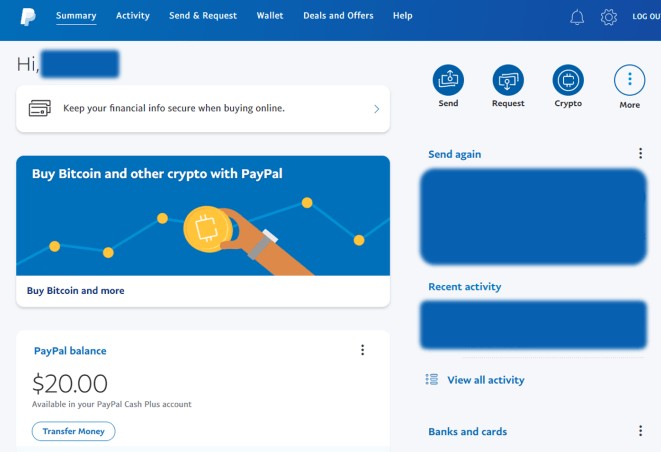
The process is pretty simple. You log in, and info about buying crypto is front and center. You click "Buy Bitcoin and more", then pick from the list of coins shown.
Some guides strongly suggest only buying Bitcoin or Ethereum when starting out. More details pop up, including a price graph. You click "Buy", then "continue" while PayPal verifies your identity for KYC rules.
You review terms that warn about risk and volatility, enter the amount, and click buy. You choose how to pay: PayPal balance, debit card, or bank account. One thing to note - you can't bid on the price when using PayPal. That is a limitation compared to some other custodial services.
The Catch With PayPal Custody
When you buy cryptocurrency on PayPal, you don't actually gain control of the coins. You cannot move those coins to someone else or to your own wallet. You have no choice but to use PayPal to buy, sell, or hold them.
Some in the crypto community believe you don't actually own the coins when you don't have true control.
This is an argument against using a custodial service like PayPal. Later info says PayPal supports external transfers for Bitcoin, Ethereum, Litecoin, and Bitcoin Cash in the US, which may change custody dynamics over time.
Funding Rules for PayPal Crypto
Clear funding rules apply for direct buying. PayPal balance, linked bank account, and debit card are supported. Credit cards and PayPal Credit are not supported, which helps users avoid failed or reversed transactions.
This is one reason buying via PayPal feels steadier than some other methods. The money paths are plain, and you know what will go through.
Using PayPal at Checkout
PayPal lets personal accounts in the US use crypto for payments during checkout. The merchant gets paid in USD. Only supported in the US at this time.
The PayPal wallet supports Bitcoin, Bitcoin Cash, Ethereum, and Litecoin for this purpose. You need a personal PayPal account in the US, the PayPal app, and a W-9 tax form.
Crypto is only an option if you have enough to pay in full. PayPal converts to USD and charges a small fee. The business pays no extra fees if they have a PayPal Balance account. Fraud, return, and shipping protection apply.
Buy Crypto with PayPal via BitPay and MoonPay
With BitPay and MoonPay, you can purchase crypto in the US and EU using PayPal balance, bank transfer, or connected card. You get competitive rates in the BitPay Wallet app or on BitPay.com and finish the purchase via MoonPay.
You get fast, secure transactions with no hidden fees. You have the freedom to buy and manage over 170 cryptocurrencies, including Bitcoin, Ethereum, and Litecoin. If you want a broad view, some compare this to looking for the cheapest crypto exchange platform before they commit.
Buy Bitcoin in the BitPay Wallet App
Step one is get the app. Download BitPay from your app store, or scan the QR code. Already have it? Skip that part.
Step two, tap "Buy Crypto" on the home screen. Step three, choose your amount and the coin. Besides Bitcoin, BitPay and MoonPay support popular coins and stablecoins like Ethereum, Dogecoin, and Litecoin.
Step four, choose PayPal as your payment method. You can also use credit card, Apple Pay, Google Pay, Venmo, and instant ACH. Step five, complete the transaction with MoonPay. MoonPay is the only BitPay partner that supports PayPal transactions in this setup.
Buy Crypto Online at BitPay.com
Visit BitPay's buy crypto page. Select from top coins like Bitcoin, Ether, Litecoin, Bitcoin Cash, USDC, and Polygon. Enter the amount you want to buy.
Enter the address where you want your crypto. You can send to nearly any self-custody wallet if you know the address. If you don't have one, you can make a free BitPay Wallet.
Select PayPal and choose the MoonPay offer. Continue to MoonPay to pay. Once confirmed, your assets go to your specified wallet. Available payment methods vary by location.
Why BitPay plus PayPal Works
BitPay gives a self-custody experience. You own 100% of the crypto you buy; no third party custody. That is a big difference from holding coins inside PayPal directly.
Rates are competitive and there are no hidden fees or annual costs. You still get multiple ways to pay. In addition to PayPal, BitPay supports credit card, debit card, Apple Pay, Google Pay, Cash App, and local bank transfer.
If you are hunting for the best platform for trading crypto , BitPay with PayPal is one path, though it is more about buying than active trading.
Buy Crypto with PayPal on Coinbase
Coinbase has a deal with PayPal that lets people buy digital currency using debit cards and bank accounts linked to PayPal. To link, select "add a payment method" in the Coinbase app.
If you used the same email for both, you are set. Otherwise, you use two-factor authentication. From there, pick how you want to pay for your crypto.
You can spend up to 25,000 dollars per day buying crypto on Coinbase via PayPal. Coinbase stopped accepting credit card purchases of crypto some years back. Cash withdrawals from Coinbase to PayPal are available in the US, Canada, EU, and UK.
Coinbase offers Bitcoin, Ethereum, and Litecoin. It does not trade Dogecoin, with a note that Dogecoin was created as a joke. If you want to learn the basics first, some new buyers read up on bit coin trade before they link accounts.
Buy Bitcoin with PayPal via CoinCola
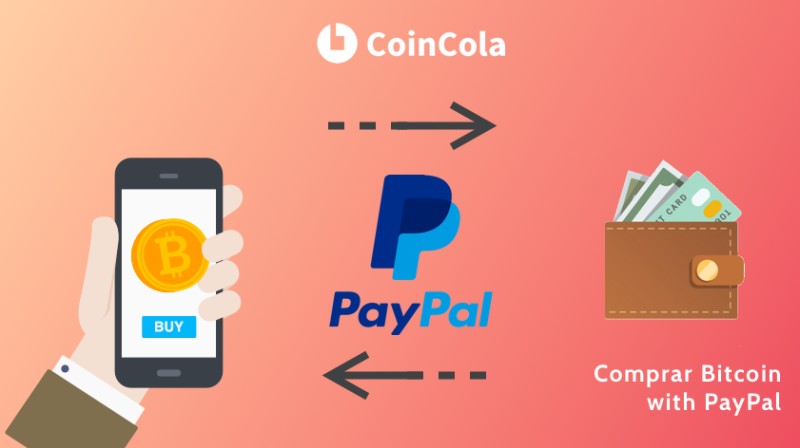
PayPal doesn't let users buy bitcoin easily directly because its dispute resolution often returns money to customers. Sellers get reluctant. CoinCola is a hybrid crypto exchange and OTC marketplace founded in 2016, based in Hong Kong, serving millions from over 150 countries.
Sellers make ads to trade coins like bitcoin, ethereum, and dash for real money. Some accept PayPal transfers, so you can buy bitcoin that way. CoinCola's fee is free for buyers and 0.7% for advertising sellers.
How to Use CoinCola with PayPal
First, register and get verified. Visit coincola.com or the app, sign up, and verify your number. Then go to user center or settings, click authentication, upload documents, and wait for confirmation.
Second, make a purchase. Go to OTC, find a seller that accepts PayPal, and click buy BTC. Open a trade, enter the amount, talk to the seller, make the PayPal transfer, then click "mark as paid" and receive your bitcoin.
CoinCola facts to keep in mind
- Free for buyers, 0.7% for ad sellers
- Supports BTC, ETH, BCH, LTC, USDT, DASH, XRP
- Founded 2016, Hong Kong based
- Verification needed before trades
Is Buying Bitcoin with PayPal Safe
Buying bitcoin using PayPal is one of the safer ways to buy crypto coins. PayPal transactions are traceable and often reversible. If something goes wrong, you can ask for money back or help finding the culprit.
Between PayPal's and CoinCola's verifications, there's very little that can happen to you as a buyer.
Sellers worry about refund fraud because the service is so safe for buyers. That is the trade-off. For buyers, the setup is pretty protective.
Buy Dogecoin with PayPal Indirect Routes
In the US, PayPal doesn't let you buy Dogecoin directly in the app. The supported list is PYUSD, Bitcoin, Ethereum, Litecoin, Bitcoin Cash, Solana, and Chainlink. So buying Dogecoin with PayPal is a workaround, not a single button.
One route is PayPal at checkout on a platform that offers DOGE. Another is start with PayPal, buy a supported coin like Litecoin, then swap into DOGE somewhere that supports swaps.
Since PayPal supports Litecoin in the US, some buyers start there, then swap in a wallet that supports DOGE swaps. Litecoin is recommended because it has much lower network fees than Bitcoin or Ethereum. You can also look into how to buy cheap crypto by avoiding double fees where possible.
Swap Litecoin to DOGE via RockWallet
Phase one: open PayPal, go to Finances or Crypto, buy Litecoin, and confirm with balance, bank, or debit. One-time ID verification enables external transfers.
Phase two: open RockWallet, find Litecoin, tap Receive, copy address. Phase three: in PayPal, go to LTC, tap Transfer, paste address, confirm amount, review network fee. It takes 10 to 30 minutes.
Phase four: in RockWallet, tap Swap, set From LTC To DOGE, enter amount, review rate, confirm. Your DOGE shows in balance. Pro tip: buying with debit on RockWallet skips PayPal and saves double fees.
Fees Limits and Funding Methods
PayPal publishes consumer fee details and a help page for crypto fees and exchange rates. The practical takeaway: always read the confirmation screen like a restaurant bill.
Fee and limit snapshot
- PayPal direct: small fee on buy/sell, hold is free
- PayPal app max: 20k weekly, 50k per year
- Coinbase via PayPal: up to 25k per day
- BitPay + MoonPay: no hidden fees, what you see is what you pay
- CoinCola: free for buyers, 0.7% for ad sellers
Funding methods for PayPal crypto are balance, bank, debit. No credit cards or PayPal Credit. BitPay also supports credit card, Apple Pay, Google Pay, Venmo, instant ACH, Cash App, local bank transfer. Coinbase uses debit and bank linked to PayPal.
If you scan for lowest crypto exchange fees , the BitPay and CoinCola paths are worth a look since buyer fees are low or zero in different ways.
PayPal USD Stablecoin and Ecosystem
PayPal USD (PYUSD) is a stablecoin issued by Paxos Trust Company with PayPal, launched August 7, 2023. It is backed by US dollar deposits, short-term US Treasuries, and similar cash equivalents, keeping a 1:1 value with the dollar.
It is regulated by the New York State Department of Financial Services. Since September 2023, Paxos has published a monthly Reserve Report, and a third party validates holdings. As of April 2025, Coinbase removed fees for buying PYUSD from USD and redeeming USD from PYUSD.
PYUSD is on multiple blockchains, DeFi protocols, and exchanges. It can be transferred to compatible wallets and auto converts to fiat at point of sale. You can trade it for any PayPal supported currency. Fast settlement and stable value are the main draws.
Safety Custody and Privacy
When you buy cryptocurrency on PayPal directly, you don't gain control of the coins. You cannot transfer them out. Some folks say you don't really own them without true control.
BitPay gives a self-custody wallet where you own 100% of what you buy. Crypto is volatile and speculative; regulators emphasize caution. Prices swing more than stocks. Scammers love urgency.
Treat your wallet recovery phrase like a master key: write it down, keep it private, don't store digitally, do not share.
PayPal transactions are traceable and often reversible, which makes buying via PayPal safe for buyers. Always read the confirmation screen for fees. Keep purchase size sensible and use a wallet setup you understand.
Merchant Acceptance via PayPal
PayPal allows personal accounts in the US to use crypto for payments at checkout. The merchant receives USD. You need a US personal account, the PayPal app, and a W-9.
Crypto only works if you have enough to pay in full. PayPal converts to USD, charges a small fee, and the business pays no extra fees with a PayPal Balance account. Fraud, return, and shipping protection applies.
Other Places People Ask About
Some readers also wonder about other apps and regions. For example, cryptocurrency luno comes up in casual chats, though it is not part of the PayPal buy paths here. I just note it so you know this post stays on PayPal.
Likewise, is pi crypto worth anything is a common question, but Pi is not in the PayPal supported list and not covered by the source. I don't make claims about it.
You might also hear about okx trading platform review or tokocrypto exchange in crypto circles. Those are separate from PayPal's own buy flow and from BitPay or Coinbase linked here.
Simple Paths I Would Weigh
If you want the least friction, the PayPal app is right there and you can start with one dollar. The catch is you don't hold the coins yourself unless you use the later transfer options for supported coins.
If you want real control, BitPay with MoonPay lets you send to your own wallet. Coinbase via PayPal is good if you already use Coinbase and want higher daily limits. CoinCola works if a seller takes PayPal and you are okay with OTC steps.
Hey, don't skip the custody part - it changes what you can actually do with your coins.
At the end of the day, you can buy cryptocurrency using PayPal through more than one road. Pick the one that fits your comfort with fees, limits, and who holds the keys.

Comments on “Buy Cryptocurrency Using PayPal: The Low-Friction Path Through BitPay, Coinbase, and More”
No comments yet. Be the first to share your thoughts.