How to Compare Mobile Crypto Wallets for Security, Control, and Ease
Best Mobile Crypto Wallets, Compared by What Matters
There is no single best wallet for everyone. A search for the best cryptocurrency wallet app often turns into a popularity contest, but a large user base says little about key safety or recovery. I would compare custody, key storage, backup, network support, fees, and daily ease before looking at brand names.
The crypto mobile wallets in this roundup include Tangem Mobile, Trust Wallet, MetaMask Mobile, Exodus Mobile, Kraken Wallet, and custodial exchange apps. They all offer phone access, but they do not solve the same problems.
Start with the job you need the wallet to do
- Daily payments call for stablecoins, QR codes, multi-chain support, and clear fees.
- Trading calls for order types, liquidity, and easy cash buys and sells.
- DeFi and NFT use calls for careful dApp connections and clear signing requests.
- Long-term storage calls for key isolation and offline backup.
- Beginner use calls for simple setup and a recovery process you can understand.
There is no best wallet without identifying its intended use.
What a Crypto Wallet Really Stores
A wallet normally does not store the coins or tokens themselves. They remain as entries on a blockchain. The wallet holds or derives the private keys that let you view balances and authorize transactions. That is why a blockchain wallet can show a balance while holding no loose coins, and why a crypto coin wallet is only a tool for managing keys.
A private key is used for several jobs
- It signs or authorizes a transaction.
- It gives control over assets tied to a blockchain address.
- It can be used to import or recover a compatible wallet.
- It can restore access on another compatible device.
- It works like a highly sensitive password, not a username.
A seed or recovery phrase can restore a compatible wallet. Common phrases use 12 or 24 words, and BIP39 is a widely used word standard. BIP32 is used to derive wallet addresses from master key material. A lost phone can be replaced, but a lost phrase with no sound backup can mean permanent loss.
Blockchain records are also hard to undo. A completed crypto payment cannot usually be reversed without the receiver's help. Public records may help trace stolen funds, but they do not force anyone to return them.
Not your keys, not your coins.
Hot, Cold, Custodial, and Self-Custodial Wallets
The hot wallet vs. cold wallet crypto question and the custody question are separate. Hot or cold describes the key's connection to the internet. Custodial or self-custodial describes who controls the key.
The four basic mixes
- A hot custodial wallet keeps keys online with a provider, as many exchange apps do.
- A hot self-custodial wallet keeps keys under your control while connecting to the internet, as most mobile apps do.
- A cold self-custodial wallet keeps keys away from general online systems, as with hardware or careful paper storage.
- A cold custodial setup is possible in theory, but it does not remove the provider's control over access.
Mobile apps are usually hot because they need internet access to reach a blockchain. Hardware wallets are built to keep keys away from a general phone or computer. Neither label tells you whether a company can freeze your account, so you still have to ask who holds the keys.
Where Mobile Wallet Risk Comes From
Mobile wallets touch many of the same attack paths as an online bank app. Phishing links, fake support messages, malicious apps, stolen phones, weak passwords, and bad token approvals can all cause loss. Rooted or jailbroken devices and old operating systems remove important layers of phone protection.
Useful controls include an app PIN, Face ID or fingerprint access, an automatic lock, encrypted local storage, full address checks, network checks, fee warnings, and transaction simulations. None of those features can help if you approve a bad request or expose your recovery phrase, so software and user behavior have to be judged together.
What Counts as Good Mobile Wallet Security
When I compare crypto mobile wallets, I look for specific answers rather than broad security claims. The key question is not just whether an app uses phone encryption. It is whether the design protects keys at the exact point they are used to sign a transaction.
Questions worth asking about wallet security
- Does the user or provider control the private key?
- Are keys encrypted when stored on the device?
- Does the app use Keychain, Keystore, or a secure element?
- Are an app lock, PIN, password, and biometrics offered?
- Are full addresses and network names shown?
- Can the app spot odd fees or risky token approvals?
- Are updates limited to trusted app stores?
- Has an outside security team published an audit?
Open-source code can help researchers inspect these choices. It does not prove safety by itself. Key generation, backup, signing, update delivery, and the way the app explains a transaction all still need review. A claim that a phone's secure element protects a key is also incomplete unless the app can use that secure element for the required signature.
How Security Tests Can Help
Coinspect's wallet testing method uses gray-box penetration tests, source review, phishing pages, malicious dApps, and realistic permission requests. Its scoring gives more weight to wallet-draining flaws than to missing comfort features. That makes sense because one stolen key can take everything, while a missing lock screen may only narrow an attack path.
The tests are still only a proxy. They cannot cover every device, operating system, provider, signing method, or human mistake. The source material also gives conflicting totals for how many wallets were tested, which is another reason to treat any score as a clue rather than a final verdict.
A ranking is not presented as an absolute measure of security.
Coin, Chain, and Token Support
A huge asset count can look impressive while telling you very little. The token must exist on the network you plan to use, through a real contract or native asset format. A shared ticker does not prove that two tokens are the same, and an imported token can still be a scam.
Check support for the assets you actually hold
- Native Bitcoin support and the Bitcoin network
- Ethereum and the correct ERC-20 token contracts
- BNB Chain and BEP-20 tokens
- Solana and its token formats
- Other chain and layer-two networks you use
- NFT standards and marketplace access
- Custom token entry with verified addresses and decimals
- The dApps, bridges, and WalletConnect requests you need
Fees need the same care. A wallet may charge no extra platform fee while the network still charges for the transaction. Swaps, bridges, fiat purchases, trading, withdrawals, and staking can each add separate costs. Mobile crypto wallet software often saves steps, but it does not make every network fee disappear.
Backup, Recovery, and Daily Ease
Self-custody gives you direct control, but it also gives you the backup job. Write down or record the recovery phrase only in a protected offline place. Keep it away from the phone, cloud notes, email, support chats, and anyone who claims they can recover funds for you.
Signs that a wallet is easy to use
- Clear setup steps and plain warnings
- A guided backup and recovery check
- Readable network and token names
- Simple fee displays
- QR scanning and an address book
- A useful portfolio view
- Fast responses from support
- A recovery method that matches the custody model
A backup should be tested before you need it. Try restoring a compatible wallet with a small amount or on a clean setup. Privacy is another tradeoff: blockchain activity is public, while custodial services may also collect identity papers, IP data, and account records. A wallet can reduce service-level data collection, but it cannot make a public blockchain transaction invisible.
Tangem Mobile and Tangem Card Hardware
Tangem Mobile is described as a self-custodial app built around mobile payments, asset management, and direct key control. The supplied high-level review gives it a high security label, but that label is an editorial rating rather than a universal measurement. Users are said to control the keys and avoid deposit-based exchange custody.
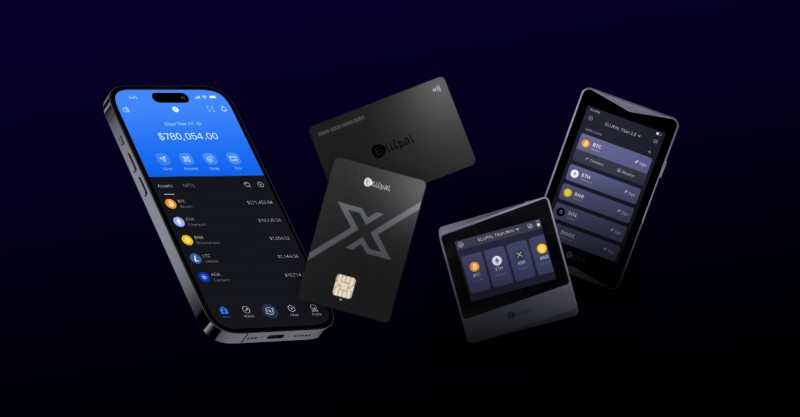
Tangem Wallet is a separate product: a battery-free NFC card used with an app. Do not merge its hardware design and claimed asset support with the Tangem Mobile profile. One is an app with a cold-storage idea; the other is card-based hardware. Mixing them makes a comparison look stronger than the source allows.
Treat a mobile wallet like a checking account, not a vault.
Trust Wallet Crypto for Beginners and Multi-Chain Use
When people ask what a crypto Trust Wallet is , they are usually looking at the self-custodial mobile app described in the source. It offers guided setup, backup steps, biometrics, a PIN, and broad multi-chain support. The Trust Wallet crypto app is presented as an easy fit for beginners who want one portfolio across several networks.
Its Web3 and decentralized exchange tools add more ways to trade inside the app. That convenience also creates more signing requests, scam-token risks, and contract risks. The source calls its security moderate, but that label is not a fixed score. Your device, backup, network choice, and the sites you connect to still matter.
MetaMask Mobile for DeFi and NFTs
MetaMask Mobile is built mainly for Ethereum and compatible networks. Its mobile and browser tools can connect to dApps, manage NFTs, use WalletConnect, add custom network settings, and reach swaps and bridges. Those features make it a common choice for people who already use DeFi.
Review every MetaMask signing request
- The destination address
- The selected network
- The token contract and decimals
- The amount being spent
- The type of approval
- The dApp domain
- The requested permissions
- The fee and simulation result
The same features widen the attack surface. A wallet connection can expose an address to a malicious site, and an approval can grant more access than you meant to give. The source calls MetaMask's security level moderate. That does not make it unsafe for DeFi; it means the user has more steps to understand.
A wallet connection does not mean a transaction is safe.
Exodus Mobile for Swaps and Portfolio Use
Exodus Mobile focuses on a clear portfolio view, mobile and desktop access, and built-in swaps. The source describes support for Bitcoin, Ethereum, Litecoin, and other assets, with self-custodial key control. It is a sensible option for someone who values an easy-to-read portfolio and wants routine swaps without moving every asset to an exchange first.
Swaps still need careful review. Check the token, network, destination, price impact, and fee before signing. The supplied reviews gave broad asset and fee claims, but they were tied to different product descriptions. I would test the networks and tokens you need instead of relying on a headline count.
Exchange Apps and Coinbase Account Differences
Centralized exchange apps work as mobile wallets because you can store, send, receive, buy, sell, and trade through them. They are custodial: the exchange holds the private keys and can restrict, freeze, or move assets under its own rules. That makes them useful for active traders, but it puts trust in the platform's security and continued operation.
A search for a wallet in Coinbase can mix separate products. One source describes Coinbase Wallet as self-custodial, while another lists Coinbase among custodial providers. The source does not settle the conflict, so you must identify the exact product, key owner, and recovery process.
Check these points before using an exchange app
- The exact product and custody model
- Who can freeze or restrict withdrawals
- How account recovery works
- Trading, withdrawal, and network fees
- Identity and payment requirements
- How to move funds into self-custody
Kraken Wallet's Published Security Design
Kraken Wallet is described as open-source, self-custodial software under the MIT license. Its published design uses BIP32 and BIP39 standards, stores secrets in the operating system's Keychain or Keystore, and encrypts a local database with non-secret wallet data. The design also covers app locks, password protection, transaction warnings, network checks, and outside security audits.
Parts of Kraken's published mobile design
- BIP32 key derivation and BIP39 recovery phrases
- Secret storage in iOS Keychain and Android Keystore
- An encrypted local database for addresses and metadata
- App-lock and password protection with user presence checks
- Argon2id key derivation and AES-GCM encryption
- Transaction simulation, address checks, and fee checks
- An API gateway that hides the user's IP from outside data services
- Updates through the normal App Store and Play Store process
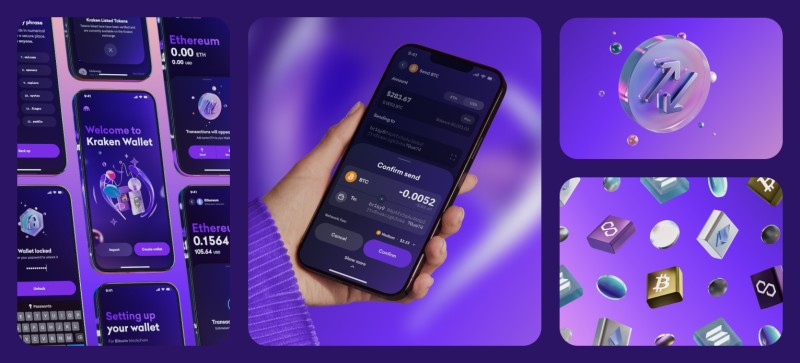
One detail matters here. Kraken's published iOS design could not sign secp256k1 transactions inside the phone's secure element because of a CryptoKit limit, so the implementation loaded key material into memory during signing. That finding belongs to that build, not every mobile wallet. Still, it shows why you should ask where a key is used, not only where it is stored. Kraken also says its client omits third-party analytics and crash-reporting kits.
Other Mobile Wallet Examples
Zengo is described as a keyless wallet for beginners. It uses multi-party computation, meaning key authority is split across more than one system, and it does not use a seed phrase. That can make recovery easier, but no seed phrase does not automatically mean self-custody. You still need to know who can restore access and what data the service holds.
BitPay Wallet is described as self-custodial, with multisig options for joint accounts or one user across several devices. That can remove reliance on one phone, but the signers and backup rules must be clear. MyEtherWallet focuses on Ethereum and ERC-20 tokens, while Edge Wallet is presented as a non-custodial multi-asset app with DEX connections.
A cryptocurrency e-wallet may run in a browser instead of installing as a phone app. MyEtherWallet and MyCrypto are named as examples. Web access can be convenient, but it does not by itself tell you whether keys are self-custodial or whether the service uses online servers.
If you are also weighing the OKX wallet app , apply the same checks used here: exact custody model, key location, backup, chain support, fee display, audits, and scam protection. A product name alone cannot answer those questions.
Mobile Wallets and Hardware Wallets
Mobile wallets are built for quick access, but their keys and signing process live near an internet-connected phone. Hardware wallets are built to keep keys inside a more isolated device. That usually makes cold storage a better fit for long-term or large balances, while a mobile app is better for payments and other active work.
Different jobs for hot and cold storage
- Daily payments: mobile wallet is easier
- On-the-go access: mobile wallet wins
- Long-term storage: hardware or cold storage wins
- Internet exposure: mobile wallets are hot
- Physical confirmation: hardware wallets usually require it
- Backup: both need a tested recovery plan
A hybrid setup keeps the amount at risk small. Store the main balance on a hardware wallet, move only what you need to a mobile wallet, and return unused funds when the spending is done. The hardware wallet's recovery phrase still needs secure offline storage, and you should verify addresses on the hardware screen rather than trusting only the phone.
A simple hot-and-cold setup
- Set up the hardware wallet and verify its backup.
- Keep long-term funds on the hardware device.
- Move a limited amount to the mobile wallet.
- Use the mobile app for payments, swaps, or dApps.
- Return unused funds and test the process with small amounts.
How to Test a New Mobile Wallet
Do not make a large deposit your first test. Install the official app, write down the custody model, and check the networks before adding money. A small test can expose a wrong address or network setting, though it cannot prove that a token or dApp is safe.
Run this check before trusting a wallet
- Download the app from the official store or verified developer site.
- Read who holds the keys and how recovery works.
- Write down the recovery process without exposing the phrase.
- Enable the app lock, PIN, biometrics, and device passcode.
- Update the phone's operating system.
- Check that the required token uses the correct network.
- Send a small test and confirm it on a block explorer.
- Review a fake or harmless transaction warning if the app offers one.
- Test the backup with a small restore where possible.
- Keep only the amount needed for active use.
Support staff should never need your seed phrase, private key, password, or remote access to your phone. Anyone who asks for one may be trying to steal the wallet. Fake airdrops, cloned sites, malicious QR codes, search ads, and look-alike app names all use the same basic trick: get you to sign or reveal something before you stop to think.
Before every transfer, check the recipient, network, token contract, amount, fee, and dApp domain. If the request is an approval rather than a payment, make sure you understand what spending permission it grants. A hardware screen can help, but a compromised computer can still feed it bad data, so compare every field.
Which Mobile Wallet Fits Your Use
The right choice comes down to the custody model and the feature you need most. A payment user may care more about stablecoins and merchant reach than DeFi. A trader may want exchange tools but accept provider custody. A long-term holder may want cold storage more than a fast swap button.
A rough match for common needs
- Secure mobile self-custody: compare Tangem Mobile's design and card option separately.
- Beginner multi-chain use: compare Trust Wallet's setup, backup, and network controls.
- DeFi and NFT use: compare MetaMask Mobile's connection and signing warnings.
- Portfolio swaps: compare Exodus Mobile's token, fee, and swap checks.
- Active trading: compare exchange apps, then decide whether custodial access is worth it.
- Long-term or large balances: use cold storage and keep the mobile balance small.
The source labels Tangem Mobile high and Trust Wallet, MetaMask, and Exodus moderate, but those are editorial categories. They are not universal security grades. I would give more weight to a clear custody model, a tested backup, outside audits, careful signing screens, and a product you can actually use without guessing.
Questions Before You Choose
Are mobile crypto wallets safe? They can be safe when you use an official app, protect the recovery phrase, update the phone, enable locks, and review every request. A self-custodial wallet depends on your backup and device. A custodial wallet depends on the provider.
Can a mobile wallet hold Bitcoin? Yes, if the app supports native Bitcoin and the correct Bitcoin network. A token with a similar symbol is not proof of support. Test a small amount before relying on a larger transfer.
What should I keep in a mobile wallet? Keep only what you need for payments, trading, swaps, DeFi, or other active work. For larger long-term holdings, cold storage or a hardware wallet gives the keys more isolation.
What is the difference between self-custody and an exchange wallet? Self-custody leaves key control with you and makes you responsible for backup. An exchange wallet holds the keys, which can make sign-in and trading easier but lets the provider control access.
What should I do after choosing? Verify custody, test the recovery process, enable app and device locks, install the official app, check network support, and start with a small amount. Hey, don't skip the backup. It is the part you will wish you had tested before trouble.
Comments on “How to Compare Mobile Crypto Wallets for Security, Control, and Ease”
No comments yet. Be the first to share your thoughts.