
How Crypto Mining With GPU Began And Why Your 4GB Card Still Works

How Crypto Mining With GPU Began
I got into reading about crypto mining with gpu a while back, and the start of it is kinda wild. Bitcoin was meant to be mined on normal computer CPUs. In the early days you could run it on a laptop and maybe pull a few coins if you were lucky. It was a small hobby for most folks, and not many companies made mining gear yet because the chips were hard to build.
Then in 2010 a guy named Laszlo Hanyecz showed up on the Bitcoin Talk Forum. He had been mining on his CPU like everyone else. But he was also a programmer, and he built the first Bitcoin Core for Mac. Eight days after he joined the forum, he posted a thing called "Generating Bitcoins with your video card." That was the first time anyone used a graphics card to mine. This is where crypto mining with gpu really started.

The GPU method was way faster than CPU. Hanyecz said it gave as much as a 10X boost in computing power. Just like that, gpu bitcoin mining was a real thing. If you ever wonder what crypto currency mining even is , this is the moment it changed from a slow CPU chore to a card-driven race.
The Guy Who Mined Pizzas With GPU
Hanyecz did not just post about it. He actually mined a ton. On May 22, 2010, he bought two pizzas for 10,000 BTC. He says he spent around 100,000 BTC that year on pizza and stuff. His wallet shows big inflows starting in May 2010, and he hit a peak of 20,962 BTC that month. He was mining so fast with his gpu rig that he refilled the pizza stack in about a week.
"I felt like I was beating the internet, getting free food. I was like, Man, I got these GPUs linked together, now I'm going to mine twice as fast." - Laszlo Hanyecz, 2019 interview
That quote always makes me laugh. To him it was Monopoly money. Nobody thought it would be worth anything big. He even said he didn't figure he needed to be greedy with it. Crypto mining with gpu was just his fun way to get free food.
Why Satoshi Wanted Him To Slow Down
Bitcoin's creator Satoshi Nakamoto emailed Hanyecz and asked him to tone down the gpu posts. Satoshi worried that GPUs would limit mining to people with fancy cards. He wanted more regular users to join with their CPUs. It is a neat bit of history when you think about what mining in crypto was supposed to be before the card rush.
"A big attraction to new users is that anyone with a computer can generate some free coins. GPUs would prematurely limit the incentive to only those with high-end GPU hardware." - Satoshi Nakamoto
Hanyecz felt a bit guilty after that. He said he was like, "Man, I feel like I crapped up your project. Sorry, dude." So he stopped advertising the gpu method. But the cat was out of the bag. Crypto mining with gpu was already moving.
What Came After GPU Mining
Years later, most big bitcoin mining moved to ASIC machines. These are boxes built only to mine, and they are pricey. Bitmain Antminer is a known name. Some cost under $2,000, others go way over $10,000. But the home gpu rig did not die. Plenty of people still do crypto mining with gpu for other coins.
A lot of folks ask whats cryptocurrency mining good for now if ASICs took bitcoin. The answer is altcoins. GPUs are flexible. You can mine coins that ASICs do not touch, then trade them. That is why the gpu rig stays a thing in basements and garages.
Building A Home GPU Mining Rig
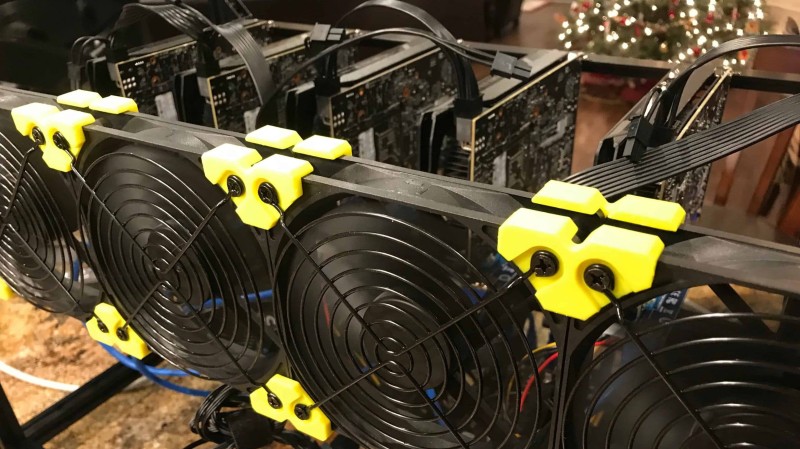
One clear example of crypto mining with gpu is a home rig built for Ethereum. It used an open-air frame, not a normal PC box. The reason is simple: hot cards need air, and open frames make swap and fix easy. The Minercase V3 was the frame, made from cheap aluminum extrusions. You can even 3D print fan clips from free plans.
Main parts of that rig
- Open-frame Minercase V3 case with 120mm Rosewill fans
- Biostar TB250-BTC board with six PCIe slots and a Mining Mode BIOS
- PCIe USB risers to lift cards off the board for cool air
- Corsair HX1000i power supply with USB link for stats
- Cheap Celeron CPU and 4GB RAM since the card does the work
- EVGA NVIDIA GTX 1060 cards as the miners
The boss of that rig was the video cards. The GTX 1060 was picked because it was about $250, low power, and good hash when overclocked. A 1080ti is faster but costs near four times more. For a hobby miner, the 1060 made more sense. Crypto mining with gpu is often a trade-off like that.
Why PCIe Speed Does Not Matter For Mining
That rig used PCIe USB risers on x1 slots. A gamer PC usually gives a GPU x16 lanes. But for crypto mining with gpu, the bus speed is not a big deal. The work happens on the card itself, not between card and board. So x1 is fine.
But if you later use those cards for deep learning, the story changes. Big AI models move data between CPU and GPU a lot. You want more lanes then. One rig with three RTX 3090s used x1 extenders and was fine for mining, but would choke on big model training. So the same gpu box can do two jobs, just not equally well.
Keeping 4GB Cards Alive A Bit Longer
Here is the part old-card owners care about. A 4GB card like RX 570 4GB hits a wall on some coins as the data file grows. Windows hogs 300 to 600MB of VRAM too. But you can stretch it. The best way for crypto mining with gpu on 4GB is to use Linux. NiceHash OS is one pick. Linux only takes about 120MB, leaving more room.
Ways to extend 4GB GPU mining
- Switch to a Linux based OS like NiceHash OS
- Add -RVRAM 1 in Extra Launch Parameters for Phoenix Miner
- Add -ERES 0 in Extra Launch Parameters for Claymore Miner
- Put an 8GB or bigger GPU in the main x16 slot with the monitor attached
One rig builder I read about stayed on Windows because he did not want driver pain. He said Windows drivers are more stable for him. But the source also says Linux is the most efficient way to extend mining with 4GB GPUs. Both views exist in the mining crowd. If you ask me, Linux is the better trick for an old 4GB card.
Hey, don't skip this part if you run old cards. The Linux move is the one that actually frees VRAM. The other flags help, but the OS swap is the big win for crypto mining with gpu on 4GB.
Overclocking For Better Profit
Overclocking means pushing the card past its stock speed. For crypto mining with gpu, this is strongly advised. You raise core or memory clock and get more hash. The RTX 2060 at stock did about 28 MH/s at 130W. With memory bumped +600, it hit 30.5 MH/s. Then drop the power limit to 75% and you keep the hash but use only 124W.
The money side is small per card but adds up. Stock earned about 0.15 EUR/day after power at 0.1 EUR/kWh. Overclock earned 0.20 EUR/day. That is more than 28% better. On a six-card rig, that is around 9 EUR more a month. Not life-changing, but real. If you want a best gpu for mining crypto pick, the 2060 shows how a tuned mid card pays.
"Overclocking GPU cards is strongly recommended as it will increase profits." - mining guide source
A Newer Rush: AI-Shape Coin Pearl
A coin called Pearl (PRL) tried a new trick. Instead of normal hashing, it used matrix math like AI does. This set off a short gpu mining rush. At first a top card pulled silly daily revenue. But as more miners joined, the pay per card dropped hard in about a month. That is the old story of crypto mining with gpu: more people, thinner slice.
Most Pearl mining ran on rented cloud cards, not home rigs. The coin only traded on small exchanges with thin volume. So the rush cooled fast. It is a good lesson if you chase the next hot thing. For how do you make money off crypto with a new coin, watch the network difficulty climb and the reward drop.
Is GPU Mining Still Worth It
Bitcoin itself is best on ASICs now. A gpu rig will lose money on bitcoin. But other coins are fair game. The GTX 1060 rig made about $300 a month at one ether price, paying back the cards in five months. Ethereum was a fave for crypto mining with gpu, though coin prices swing and can bust the plan.
You might also wonder what is best cryptocurrency to mine at home. There is no one answer. It depends on your card, power price, and if you can stand the noise. Some ask is pi crypto worth anything yet - that one is not in this source, so I can't say. Stick to coins your gpu can actually mine and that trade somewhere real.
Heat, Noise, And Power Cost
Mining gear gets hot. Those GTX 1060 cards hit about 94 degrees at the back. Noise was around 50 decibels with stock cooler, then near silent after a Noctua swap. Power draw for the six-card rig was about 516W average, not the 1200W some forum folks claimed. At low power rates, the cost stays small. At high rates, mining gets dumb fast.
If you run crypto mining with gpu, think about where it lives. One builder kept his in the garage because the wife said no kitchen. Smart. The heat and fan sound are no joke in a small room. A friend looked at a warehouse, which is the next step up if you go big.
Why GPUs And Not CPUs
The easy way to get it: a CPU is like four smart scientists with shovels. A GPU is thousands of dumb guys with whips building a pyramid. Crypto mining with gpu wins because the math is brute force, not brain surgery. Thousands of simple cores beat a few smart ones for this job.
This also answers whats cryptocurrency mining really needs at the hardware level. You need many small workers, not one big brain. That is why a 4GB card with lots of cores still has life if the software lets it.
Software To Run The Rig
You need a tool to manage the cards. NiceHash Miner is one common pick, and it wraps Phoenix or Claymore. You also want a way to set clocks without fuss. MSI Afterburner is the go-to for tuning. If you want a crypto coin mining software that holds your hand, NiceHash is a fair start for crypto mining with gpu.
And do not sleep on free tools. A crypto miner for free like the basic NiceHash client lets you benchmark before spending cash on power. Just watch the fees and the coin price. The software is free, the electricity is not.
What If The Market Drops
If crypto bottoms out, you still own the rig. That is the hedge some builders talk about. The hardware is an asset you can sell or reuse. One turned his box into a media server or a kid PC. For crypto mining with gpu, the cards have life after mining, unlike a single-use ASIC.
Some also ask how do i use crypto once mined. You trade it, hold it, or pay with it where allowed. The source does not go deep there. But the point is, gpu mining gives you coins you can then move, not just a hole in your power bill.
Energy And The Environment
Mining draws power, and the world is watching. Cards get hot and need cooling, which adds cost. Big warehouses of miners use real energy. Governments want lower carbon, and that pressure is not going away. For crypto mining with gpu, better cards and better cool ways are the path if we want it to last.
"World governments want to reduce their carbon footprint, and rightfully so." - mining market writeup
The Bar Keeps Rising
The start was anyone with a laptop. Now the entry cost is higher as tech improves and companies join. Home crypto mining with gpu is harder to make pay, but not dead. Tools exist to estimate profit, and card makers keep promising faster graphics. The bulk of mining was once individuals. That shift matters for new miners.
If you are new, read before you buy. A wrong card or a bad power rate kills profit. The old 4GB tip, the overclock gain, and the Linux move are the simple levers. Crypto mining with gpu is still a hobby with edges to learn, not a magic money tap.

Comments on “How Crypto Mining With GPU Began And Why Your 4GB Card Still Works”
No comments yet. Be the first to share your thoughts.